An AI script generator helps you move from idea to draft. You give the tool a topic, a format, and a tone. The tool returns a structured script you can refine. The best part is not the “perfect” wording. The best part is speed plus structure, which makes filming easier.
What Is an AI Script Generator?
An AI script generator is software that creates script drafts from prompts. You describe the content you want to make, and the tool writes a script that matches your request. The script can be for a YouTube video, a short-form voiceover, a podcast segment, an ad, or a webinar.
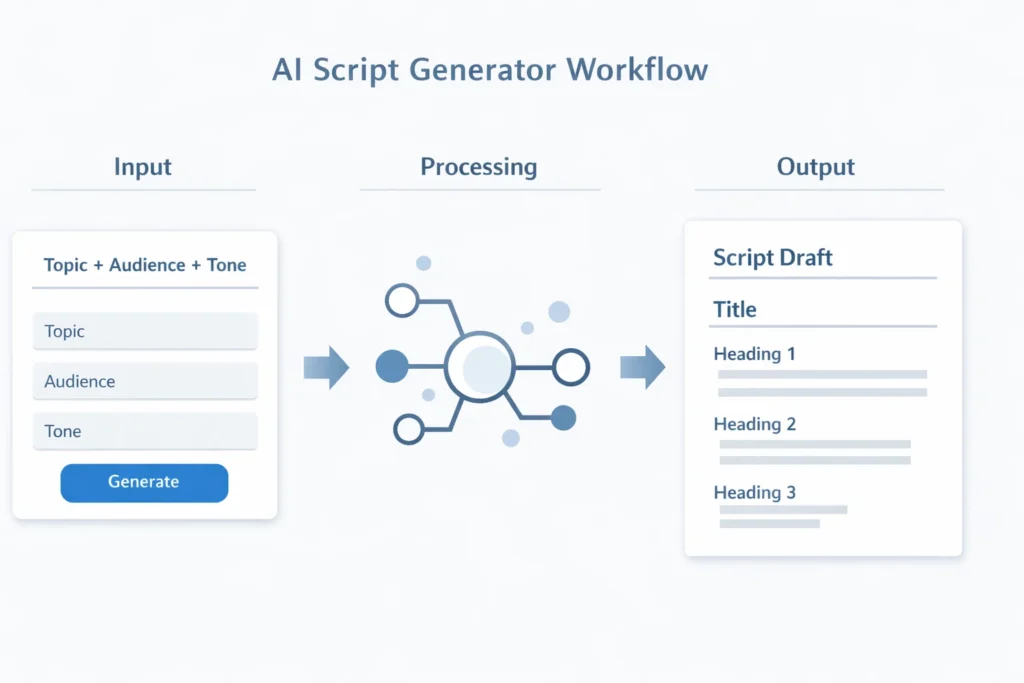
Most AI script generators run on large language models. These systems generate text by predicting the next best words based on patterns learned from training data. The tool does not “think” like a human. The tool also does not know your exact audience unless you tell the tool. When you give clear context, the output becomes more usable.
Creators usually treat the script as a first draft. The creator edits for voice, facts, and pacing. This approach keeps the script personal and accurate while cutting the time spent staring at a blank page.
How an AI Script Generator Works
Most tools follow the same core process. The interface may differ, but the steps look similar.
Input shapes the output

You start by giving the tool a prompt. A prompt can be short, but the prompt should be clear. You’ll get better results when you include the platform, the audience, the length, and the tone. If you want a 6-minute YouTube script, say that. If you want a 45-second Shorts script, say that too.
A useful prompt can look like this: “Write a 5-minute YouTube script for beginners about saving money. Use a calm, friendly tone. Include one example story.” That single sentence gives the tool direction.
Structure comes next
After the prompt, the tool builds a plan. Many scripts follow a familiar shape: hook, promise, points, examples, recap, and close. A good AI script generator can adjust the structure if you ask. You can request a story-led intro, a problem-solution format, or a simple tutorial flow.
Structure is the real value because structure controls clarity. When structure is clean, viewers follow along. When structure is unclear, viewers drop off.
Drafting fills in the lines
Once the tool chooses a structure, the tool writes the script. The tool adds transitions, talking points, and often a call to action. Some tools can also generate multiple variations so you can pick the best one.
The draft still needs your edit. You may shorten lines, add personal details, or remove repetition. That editing step is normal and healthy.
7 Powerful Ways Creators Use an AI Script Generator to Write Faster
The title promises seven ways, so here are seven real, practical uses that creators rely on. Each use case saves time in a different part of the workflow.

1) Turning a rough idea into a clear outline
Many creators don’t need more ideas. Creators need a clean order. An AI script generator can take a messy topic and produce a logical outline in seconds.
This helps when you know the topic but don’t know where to start. You can ask for an outline with three main points, then ask for a hook and a strong ending. When the outline looks right, you expand section by section. This prevents wasted time rewriting a full script later.
2) Writing better hooks that hold attention
Hooks decide whether people stay. A weak hook sounds generic and slow. A strong hook sounds specific and urgent without being dramatic.
An AI script generator can create several hook styles fast. You can ask for a hook that starts with a question. You can ask for a hook that calls out a mistake. You can ask for a hook that uses a short story.
You then pick one hook and rewrite in your voice. That small rewrite helps the hook feel real.
3) Compressing long topics into short-form scripts
Short-form content needs tight writing. Many creators struggle to shrink a topic into 30–60 seconds. The tool helps because the tool can summarize and cut filler quickly.
You can paste a long explanation and ask for a 45-second voiceover. You can request short sentences and simple words. You can also ask for a clear closing line that tells viewers what to do next.
This method works well for Shorts, Reels, and TikTok, where every second matters.
4) Rewriting the same script for different audiences
A script for beginners sounds different from a script for advanced viewers. A script for LinkedIn also sounds different from a script for YouTube.
Creators use AI script generators to rewrite a draft for different audiences. You can keep the main points and change tone, pacing, and examples. You can also change the script length for each platform.
This approach helps creators repurpose content without writing from scratch each time.
5) Improving transitions to reduce rambling
Many creators ramble because the script lacks transitions. Without a bridge, the speaker fills time with extra words. That makes editing harder and pacing slower.
An AI script generator can create clean transitions between sections. You can request “simple transitions that sound spoken.” You can also ask for quick recap lines that remind viewers where they are.
This makes your delivery smoother and your edit shorter.
6) Creating multiple versions for testing
Creators who test hooks and intros often improve faster. Testing helps you learn what your audience responds to.
An AI script generator can create two or three versions of the same script. You can test different intros or different calls to action. You can also test a story-led version versus a direct version.
Here are a few simple things creators often test:
- Hook style
- First minute pacing
- Ending call to action
This is one of the few areas where a small change can improve results.
7) Turning notes or transcripts into a full script
Sometimes you already have the content in another form. You might have bullet points, a voice memo, or a live stream transcript. The tool can turn that raw material into a clean script.
You can paste your notes and ask for a structured draft. You can ask for cleaner wording and shorter lines. You can ask the tool to remove repetition and tighten the story.
This is a practical way to reuse your own content without losing your voice.
When an AI Script Generator Helps Most
An AI script generator helps most when you create content often. The tool also helps when your content needs structure, like tutorials, reviews, and educational videos.
The tool is also useful when you feel mental fatigue. You may know the topic well but still dread writing. A draft gives you a starting point. Starting is usually the hardest part.
That said, the tool does not replace your experience. Personal stories and real opinions still come from you. The best scripts blend AI structure with your real examples.
Common Mistakes to Avoid
AI scripts can feel off when creators skip the editing step. These mistakes show up often.
One mistake is using a vague prompt. “Write a script about fitness” produces a generic draft. “Write a 6-minute script for beginners about restarting workouts after a long break” gives the tool direction.
Another mistake is keeping the first draft unchanged. Most drafts need trimming. You should tighten the hook, simplify the middle, and clean the close. Those edits matter more than fancy wording.
A third mistake is trusting facts without checking. If your script includes claims, verify the claims. This matters for health, money, and product reviews.
A final mistake is ignoring spoken rhythm. Read the script out loud. If a line feels heavy, shorten the line. If a paragraph feels long, split the paragraph.
How to Get Better Results From an AI Script Generator
Better prompts produce better drafts. You don’t need complex instructions. You need clarity.
Start by asking for an outline first. Approve the structure. Then ask the tool to expand the outline into a full script. This keeps the script organized.
You can also add a few voice anchors. Voice anchors are phrases you use often, like “Here’s the simple part” or “Let’s break this down.” Adding two or three voice anchors helps the draft sound more like you.
Use constraints when needed. Ask for short sentences and natural transitions. Ask for one example story. Ask for a calm tone if your audience prefers that.
Finally, keep your editing focused. You don’t need to rewrite everything. You usually need to fix the hook, smooth transitions, and tighten the close.
Final Thoughts
So, What Is an AI Script Generator? An AI script generator is a drafting tool that turns your idea into a structured script. The tool helps you write faster and stay organized.
The best results happen when you treat the output as a first draft. You add your own stories, your opinions, and your edits. That mix keeps your scripts clear, natural, and easier to record.
FAQs
Can an AI script generator write a full YouTube script?
Yes, most tools can produce full scripts. You should still edit for voice, pacing, and accuracy.
Do AI script generators work for Shorts and Reels?
Yes, and short-form is often where AI helps most. Tight scripts are harder to write than people expect.
Will an AI script generator match my style?
The tool can match your style better when you provide examples and clear tone direction. Your edits still matter.
Do AI script generators replace scriptwriters?
AI helps with drafting and structure. Humans still drive storytelling, originality, and judgment.
What should I include in a prompt for best results?
Include topic, audience, platform, length, tone, and the goal of the script. Add one example if possible.

Zahid Ali focuses on reviewing AI tools, marketing software, and funnel systems. His reviews break down real-world use cases, setup difficulty, pricing structures, and who each product is best suited for.