If you’ve ever felt buried under tasks like sending follow-up emails, welcoming new subscribers, or reminding people about your latest video or offer, you’re not alone. Most creators and online business owners hit a point where doing everything manually just doesn’t scale. That’s exactly where automations come in.
Instead of manually clicking “send” on every email or trying to remember who to follow up with, you can let smart software tools handle those repetitive steps for you. When set up properly, automations quietly work in the background—welcoming new subscribers, sending sequences, tagging people based on what they clicked, and freeing up your time to focus on higher-level work.
In this deep-dive guide, you’ll learn:
- What automations actually are in the context of email marketing software
- How automations help you save time (not just in theory, but in real workflows)
- The key types of automations you can set up as a beginner
- Practical use cases for creators, affiliate marketers, and digital entrepreneurs
- A step-by-step beginner setup you can follow
- Common mistakes to avoid so your automations don’t become a mess
By the end, you’ll understand how automations help you save time, and how to start using them to build a more scalable, predictable online business.
What Are Automations in Email Marketing Software?
When people talk about “automations” in email marketing software, they’re usually referring to rules and workflows that tell your software tools what to do when a certain event happens.
In plain English, an automation says:
“If this happens, automatically do that.”
For example:
- If someone subscribes to your newsletter, then send a welcome email.
- If someone clicks a link about AI tools, then tag them as “Interested in AI tools.”
- If someone buys your course, then move them from “prospective students” to “customers” and send onboarding emails.
Instead of you manually sending every message or updating every contact, email marketing software can do it based on triggers and conditions you define.
This is why automations are so powerful: once they’re set up, they keep working 24/7, even when you’re offline, asleep, or working on your next project.
How Automations Work (Step-by-Step Logic Behind the Scenes)
To understand how automations help you save time, it helps to see how they work behind the scenes inside your software tools.
1. Triggers: What Starts the Automation
Every automation starts with a trigger—an event that tells the system, “Start this workflow now.”
Common triggers include:
- A new subscriber joining a specific list or form
- A tag being added (for example: “Downloaded AI Tools Guide”)
- A purchase being completed
- A link inside an email being clicked
- A date or time (e.g., a scheduled event or webinar reminder)
Once this trigger fires, the automation begins.
2. Actions: What the Software Does Automatically
After a trigger, you define actions—the steps that happen automatically.
Examples of actions in email marketing software:
- Send a welcome email
- Wait 1 day
- Send a follow-up email with useful resources
- Add a subscriber to a new segment
- Remove a tag and apply another tag
- Notify you (or a team member) about a specific action
You can chain multiple actions together to build powerful sequences that are still easy to understand.
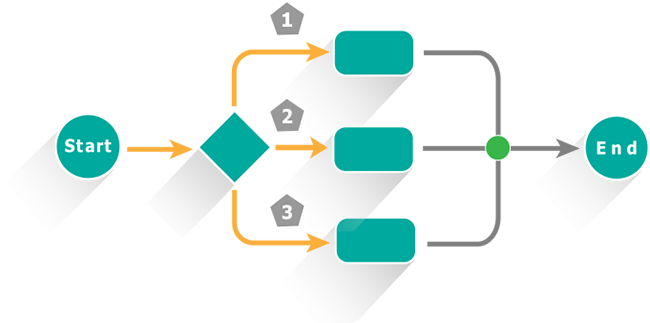
3. Conditions and Branches: If/Else Logic
More advanced automations use conditions or branches—for example:
- If the subscriber opened the previous email → send a more advanced resource
- If the subscriber did not click the main link → resend a slightly different angle
- If the subscriber has tag “Customer” → skip this sales pitch email
This “if/else” logic lets you create more personalized experiences without manually segmenting everyone by hand.
4. Endpoints: Where the Automation Stops
Every automation should have a clear endpoint, like:
- After the last email in your welcome series
- After tagging the subscriber as “Nurtured” or “On main newsletter”
- After a purchase is made or a goal is completed
Once the automation ends, subscribers usually move into your normal newsletter flow or onto a different automation.
Key Ways Automations Help You Save Time
Here’s where the real payoff happens. Let’s look at exactly how automations help you save time across your content, marketing, and business workflows.
1. No More Manually Sending Welcome Emails
Without automations, every new subscriber would require you to:
- Notice they joined
- Compose a welcome email
- Hit send manually
That’s impossible to scale beyond a handful of subscribers.
With a simple welcome automation, your email marketing software:
- Sends a friendly introduction
- Delivers any promised freebie (eBook, checklist, tutorial, etc.)
- Sets expectations about what kind of emails they’ll get next
It happens every time, automatically, whether you get 1 new subscriber per week or 1,000.
2. Turning One-Time Content into Evergreen Sequences
You probably write guides, tutorials, or reviews that stay useful for months or years. Automations let you:
- Turn 5–7 helpful emails into a permanent welcome or educational sequence
- Automatically send that sequence to every new subscriber
- Get ongoing value from content you only wrote once
Instead of constantly writing brand-new emails, you repurpose your best content in sequences that your list sees at the right time.
3. Following Up Without Remembering Anything
Manual follow-up is one of the biggest time drains:
- Remembering who showed interest in something
- Digging up their email
- Writing a message
- Sending it
Automations can:
- Automatically follow up with people who clicked a specific link
- Remind someone about a free training or webinar
- Nurture leads who downloaded a free resource but haven’t taken the next step
That’s how email marketing software quietly increases your engagement and conversions while giving you your time back.
4. Segmenting Subscribers While You Sleep
Segmentation is valuable but tedious if done manually. Automations can:
- Add tags based on what content someone consumed
- Group people into segments (AI tools, software tools, make money online, etc.)
- Keep your subscriber database organized in real time
That means when you want to send an email about AI tools, you’re not guessing—your segments are already up to date.
5. Reducing Repetitive Customer Support Tasks
If you sell digital products, templates, or training, you know how repetitive some questions can be.
Automations can:
- Send onboarding emails that answer common questions in advance
- Provide step-by-step instructions after someone buys
- Share FAQs and tips that reduce the number of support requests
The result: better customer experience and fewer emails you personally need to respond to.
Practical Use Cases: Where Automations Shine
Here are some real-world examples of how automations help you save time across different types of online businesses.
For Content Creators and Bloggers
Automations can:
- Deliver a “Start Here” series to new readers
- Send category-specific sequences (AI tools, software tools, make money online) based on signup source
- Automatically share older but evergreen content that new subscribers haven’t seen
For Affiliate Marketers
Automations can:
- Segment subscribers by interest (e.g., AI image tools vs video tools vs email tools)
- Deliver an educational series about a problem before recommending solutions
- Remind subscribers about webinars, case studies, or comparison guides
You get more clicks and conversions without manually chasing every lead.
For Course Creators and Coaches
Automations are perfect for:
- Onboarding new students (course access, where to start, community links)
- Drip-feeding content over time (modules, lessons, reminders)
- Upselling advanced programs only after someone completes the basics
For Freelancers and Agencies
With smart workflows, your software tools can:
- Send automatic follow-ups to leads who filled out your contact form
- Deliver pricing guides or service overviews instantly
- Nurture leads who aren’t ready yet, so they remember you when they are
This keeps your pipeline warm without you constantly writing one-off emails.
Step-by-Step Beginner Guide: Setting Up Your First Automation
You don’t need to build complex funnels on day one. Here’s a simple path to start tapping into the power of email marketing software automations.
Step 1: Choose a Single Goal
Pick one specific outcome for your first automation, such as:
- Welcome new subscribers and introduce them to your best content
- Deliver a free resource and follow up with more tips
- Onboard new customers for a digital product
Keeping your goal focused helps you avoid overcomplicating things.
Step 2: Map the Workflow on Paper (or Notes)
Before clicking around your software tools, sketch the automation:
- Trigger: “When a subscriber joins List A from Form X”
- Email 1: Welcome + deliver freebie (send immediately)
- Wait: 1 day
- Email 2: Share 2–3 helpful articles + ask a simple question
- Wait: 2 days
- Email 3: Share a story, a case study, or results your content can help with
- End: Add tag “Completed Welcome Sequence”
This simple map makes it much easier to build inside your email marketing software later.
Step 3: Write or Adapt Your Emails
Write 3–5 emails that:
- Are friendly and conversational
- Focus on helping the subscriber get a quick win
- Subtly introduce who you are and what your site offers
Don’t worry about being perfect. You can always come back and optimize later as you see how subscribers respond.
Step 4: Build the Automation in Your Software
Inside your email marketing tool:
- Create a new automation or workflow.
- Set the trigger (e.g., “Subscribed to list” or “Submitted form”).
- Add the sequence of actions:
- Send Email 1
- Wait X days
- Send Email 2
- Wait X days
- Send Email 3, etc.
- Add any tags or segmentation at the end (e.g., “Welcome-Done”).
Step 5: Test the Automation Yourself
Before you turn it on for everyone:
- Subscribe using your own email address
- Go through the entire sequence as if you were a new subscriber
- Check timing, formatting, and links
- Make sure the right tags or segments are applied
Testing helps you catch simple issues early—like wrong links or typos.
Step 6: Activate and Monitor
Once you’re happy:
- Turn on the automation
- Let real subscribers start flowing through
- Check statistics after a few days and weeks:
- Open rates for each email
- Click-through rates
- Where subscribers drop off
Then tweak subject lines, content, and timing for better results.
Tips for Getting the Most Out of Automations
Once you’ve built your first automations, these tips will help you get more value without overwhelming yourself.
Start Small and Stack Later
Resist the urge to build a giant, branching system at the beginning. Better to:
- Create one simple welcome sequence
- Make it work well
- Then add a second automation (e.g., a lead magnet or mini-course sequence)
Over time you’ll have a network of automations, but each piece will be clear and intentional.
Use Tags and Segments From Day One
Even simple tagging helps later, for example:
- Tag: “AI Tools Interest”
- Tag: “Make Money Online Interest”
- Tag: “Free Resource: Email Marketing Checklist”
These tags take seconds to apply via automation and save you hours when you want to send targeted emails later.
Keep Automations Documented
As you add more workflows, document:
- What each automation does
- Its trigger and main purpose
- Where subscribers go afterward
This could be in a simple Google Doc or a mind map. Proper documentation prevents confusion later and makes troubleshooting much easier.
Revisit and Refresh Regularly
Automations aren’t “set and forget” forever. Every few months:
- Re-read your automated emails
- Update outdated information or links
- Swap in better-performing content if needed
Think of your automations like a living library that you maintain and improve over time.
Common Mistakes When Setting Up Automations
Even though automations help you save time, they can cause confusion if misconfigured. Here are common pitfalls to avoid.
Overcomplicating Too Early
Building a massive, branching “spider web” automation when you’re still learning your software is a recipe for frustration. Keep early workflows:
- Short
- Clear
- Easy to follow
When you fully understand how email marketing software handles triggers, waits, and conditions, you can safely build more complex systems.
Forgetting to Add an Exit or Goal
Every automation should have a clear endpoint. Without one, subscribers might:
- Stay stuck in a loop
- Receive outdated or irrelevant emails
- Be unable to move into your main newsletter or new sequences
Always define where an automation stops, and what happens next.
Not Testing Before Sending Traffic
If you don’t test:
- Emails might send at the wrong time
- Tags might not apply correctly
- Subscribers may not receive promised resources
Always run through the automation as a test subscriber before promoting the form or funnel heavily.
Sending Conflicting Messages
If you add subscribers to multiple automations at once without planning, they may:
- Receive overlapping emails
- Get too many messages in a short time
- See confusing or contradictory offers
Use conditions and tags to control which automations someone should enter and when.
Advanced Insights: Big-Picture Benefits of Automation
Once you have several automations running smoothly, you’ll realize that how automations help you save time goes beyond just hours saved.
You Build Systems, Not Just Tasks
Instead of thinking, “I need to send this email today,” you start designing systems:
- “When someone joins this list, they go on this journey.”
- “When someone clicks this interest link, they get this educational sequence.”
This systems-thinking perspective is what separates hobby projects from scalable businesses.
You Free Yourself for High-Value Work
When automations handle:
- Welcomes
- Basic nurtures
- Simple follow-ups
You can spend more time on:
- High-quality content creation
- Partnerships and collaborations
- Strategy, testing, and optimization
- Building new products or services
The more repetitive tasks you hand to software tools, the more your limited time can go toward things humans do best.
You Create a Better Experience for Subscribers
Good automations don’t just help you—they help your audience. They receive:
- Helpful content at the right time
- Clear next steps and guidance
- Fewer “random” emails and more relevant ones
That builds trust, lowers unsubscribe rates, and improves the performance of everything else you do.
Conclusion
Automations are one of the biggest time-savers in the world of software tools and email marketing software. Instead of manually sending every email, tracking every subscriber, and trying to remember who needs what, you can:
- Use triggers, actions, and conditions to build smart workflows
- Turn one-time content into evergreen sequences that run continuously
- Keep your audience engaged and informed while you focus on higher-level tasks
- Build a real system that scales with your traffic, subscribers, and offers
If you’re serious about online growth—whether you’re into AI tools, software tutorials, or make-money-online content—learning how automations help you save time is essential. Start with one simple welcome automation, test it, refine it, and then gradually build more. Over time, your automations become one of your most powerful “silent partners” in your business.
Frequently Asked Questions
No. Most modern email marketing software platforms offer visual builders where you can drag and drop triggers, actions, and waits. If you can follow a simple flowchart, you can set up basic automations.
Not completely. Automations are great for predictable flows (welcome sequences, onboarding, reminders), but you’ll still want to send occasional broadcasts, updates, and personal messages. Think of automations as your baseline engine, not your entire communication.
Start with 1–3: a welcome sequence for new subscribers, a lead magnet delivery sequence (if applicable), and a simple onboarding automation for new customers (optional to start). Once those are working well, you can add more specialized automations over time.
While this guide focuses on email marketing software, automations also exist in other software tools—like CRM platforms, project management tools, and integration services (for connecting apps). The core idea—“If this, then that”—applies across your entire tech stack.
Look at how many tasks you no longer do manually, how many subscribers are moving through your sequences each month, and the open/click rates and conversions from automated emails. If hundreds (or thousands) of people are going through your workflows without you lifting a finger, your automations are doing their job.