If you’ve ever forgotten to reply to a lead, lost track of a customer’s last message, or had no idea where a deal stands, you’ve already felt the problem a CRM is built to solve.
As your business grows, it becomes harder to remember every conversation, keep notes organized, and follow up at the right time. That’s where CRM & sales tools come in: they help you manage customers more clearly, consistently, and profitably—without needing to be a tech expert.
In this guide, you’ll learn in simple language how CRMs help manage customers at every stage, from first contact to long-term loyalty.
What Is a CRM and How Does It Relate to Customer Management?
CRM stands for Customer Relationship Management. A CRM tool is a software tool that helps you:
- Store all your contact and customer data in one place
- Track emails, calls, and meetings
- See where each lead or customer is in your sales pipeline
- Plan follow-ups, tasks, and reminders
- Build stronger, more organized relationships over time
Instead of scattered spreadsheets, inboxes, and sticky notes, a CRM gives you a single system of record for everything related to your customers.
How CRMs Help at Every Stage of the Customer Journey
A good way to understand how CRMs help manage customers is to look at the full journey:
- When someone first discovers you
- When they become a lead
- While you’re nurturing and selling
- After they buy (support, retention, upsells)
CRMs support you across all four stages.
1. Capturing Leads and New Contacts
When people show interest—by filling a form, downloading a free guide, or booking a call—you need to capture that information instantly and correctly.
A CRM helps by:
- Automatically creating a new contact record when someone fills a form or signs up for something
- Storing how they found you (social media, ad, webinar, referral, etc.)
- Tagging them with relevant labels (e.g., “YouTube lead”, “High-value lead”)
This means no lead gets lost just because their email buried itself in your inbox.
2. Organizing Customer Data
Instead of keeping data in several apps, a CRM centralizes everything about a contact:
- Basic info (name, email, phone, company, website)
- Notes from calls or meetings
- Previous orders or deals
- Attachments (quotes, contracts, proposals)
- Tags: “VIP”, “Trial”, “Cold”, “Hot Lead”, etc.
Centralizing customer data is one of the core benefits of CRM systems because it creates one source of truth for your team.
3. Tracking Interactions Over Time
Every email, call, and meeting can be logged or automatically tracked, so anyone on your team can open a contact record and see:
- When you last spoke
- What you talked about
- Promises made (“I’ll send pricing tomorrow”)
- Next steps (“Follow up in 3 days”)
This history makes it much easier to deliver personal, context-aware communication instead of starting from scratch every time.
4. Managing Deals and Pipelines
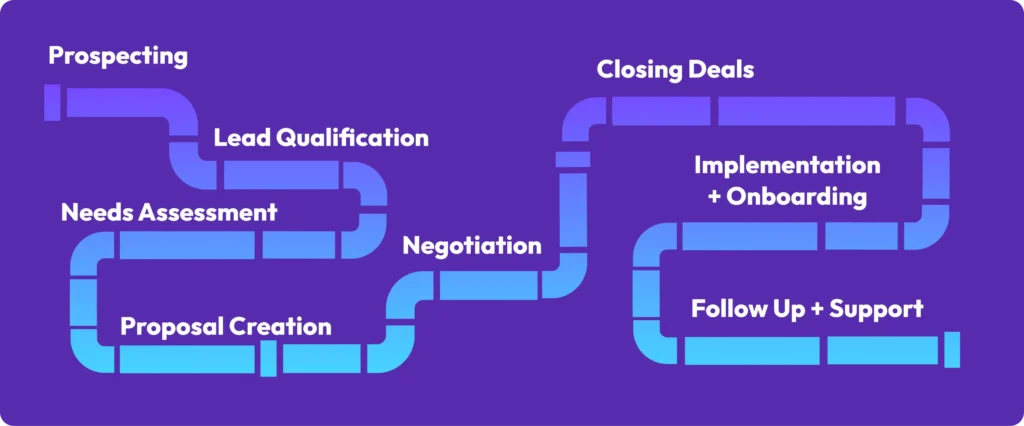
CRMs usually have visual pipelines (often drag-and-drop boards) with stages like:
- New lead
- Contacted
- Qualified
- Proposal sent
- Negotiation
- Won / Lost
Each deal is a card on this board. You move deals along as they progress. This helps you:
- See where each customer is in their journey
- Spot bottlenecks (e.g., many deals get stuck at “Proposal sent”)
- Forecast potential revenue based on pipeline value
This pipeline view is one reason CRM software is considered essential for structured sales processes.
Key Ways CRMs Help You Manage Customers Better
Let’s go deeper into specific ways CRMs improve customer management in daily work.
1. No Customer Gets Forgotten
Without a CRM, it’s easy to forget:
- A lead who asked for pricing
- A customer whose contract expires next month
- A trial user who never finished onboarding
A CRM can:
- Remind you when to follow up
- Flag accounts with low activity
- Highlight upcoming renewals or expirations
In other words, the system acts as a safety net so fewer customers fall through the cracks.
2. Faster, More Personalized Responses
Because CRMs store past interactions and preferences, you can respond in a more tailored way:
- “Hey Mike, how did your Black Friday campaign go?”
- Remembering which product a client was considering
- Knowing if they like email over phone calls
When a customer feels like you remember their situation, trust grows, and managing the relationship becomes smoother.
3. Clear Ownership and Accountability
A CRM lets you assign each contact or deal to a specific owner (sales rep, account manager, support agent).
This means:
- Everyone knows who is responsible for each customer
- Tasks and activities are tied to a person
- Managers can see where help is needed
It turns customer management from “I thought you were handling that” into a clear, trackable workflow.
4. Better Collaboration Across Teams
Marketing, sales, and support often work in silos. A CRM breaks those walls by letting all teams:
- See the same customer record
- View marketing activity (emails opened, pages visited)
- Understand support history (tickets, issues, complaints)
This unified view helps teams deliver consistent experiences across all touchpoints, a key reason CRMs are used as a central hub in modern businesses.
5. Stronger Customer Retention
CRMs aren’t just for getting new customers—they also help you keep the ones you have:
- Identify customers who haven’t engaged in a while
- Schedule check-ins before renewals or contract end dates
- Create segments for loyalty or reactivation campaigns
Research on CRM benefits suggests that retention improves when you systematically track engagement and reach out before problems grow.
Real-Life Examples: How Different Businesses Use CRMs to Manage Customers
Example 1: A Small Digital Agency
A small marketing agency uses a CRM to:
- Log every new inquiry from their website
- Tag leads as “interested in SEO”, “social media”, or “paid ads”
- Track proposals and send reminders to follow up
- Keep notes on each client’s brand voice, target audience, and goals
This turns a messy inbox into a structured list of relationships, each with a clear next step.
Example 2: A Freelance Consultant
A solo consultant offering strategy sessions uses a CRM to:
- Store contact details from networking events and LinkedIn
- Track who booked a free call, who became a client, and who is on the fence
- Set reminders for 30-day and 90-day check-ins
- Keep all notes from sessions in one place
Even as one person, they look organized and professional, because every client interaction is easy to recall.
Example 3: An Online Course Creator
A creator selling online courses might:
- Sync their email list with a CRM
- Tag contacts based on which free webinar they joined
- See who visited the sales page but didn’t buy
- Plan targeted follow-ups for those warm leads
This kind of segmentation and follow-up is much easier with a CRM than with a plain email list alone.
Beginner-Friendly Steps: How to Use a CRM for Customer Management
You don’t have to use every feature from day one. Here’s a simple path to using CRM & sales tools to manage customers effectively.
Step 1: Define Your Basic Stages
Start by writing down your customer journey in 5–7 simple stages, such as:
- New lead
- Contacted
- Qualified
- Proposal or demo
- Decision pending
- Won
- Lost
These will become your pipeline stages in the CRM.
Step 2: Import Your Existing Contacts
Collect data from:
- Spreadsheets
- Email contacts
- Old CRM or tools
Clean it as you go:
- Remove duplicates
- Fix obvious spelling errors in names or emails
- Add tags like “Client”, “Lead”, “Partner”
Now import into your CRM so you have one clean list to start from.
Step 3: Assign Owners and Add Notes
Go through your important customers and:
- Assign an owner (you, a team member, etc.)
- Add a short summary note (e.g., “Interested in Q1 campaign upgrade”)
- Set a next action (call, email, or meeting)
From this point on, customer management becomes proactive, not reactive.
Step 4: Use Tasks and Reminders Daily
Each workday:
- Open your CRM first
- Look at today’s tasks and upcoming follow-ups
- Complete them and update deal stages
This daily rhythm turns your CRM into a control center for customer management instead of a static database.
Step 5: Start Tracking Simple Metrics
Once things are running, use CRM reports to answer questions like:
- How many new leads did we get this month?
- What’s our average time from “New lead” to “Won”?
- Where do most deals get stuck?
Free guides like Salesforce’s “What is CRM?” overview and HubSpot’s CRM basics guide can help you understand typical metrics and best practices while you learn.

How CRMs Improve Communication With Customers
Good customer management is mostly about clear, timely, and consistent communication. CRMs help here too.
Centralized Communication History
Instead of digging through email threads, you can:
- See all emails, calls, and notes in one timeline
- Quickly understand the last touchpoint before replying
- Avoid asking “Have we spoken before?” or repeating questions
Faster Responses With Templates
Many CRMs let you:
- Create templates for common replies (pricing, onboarding, check-ins)
- Personalize with fields like {{First Name}} and {{Company}}
- Send follow-ups more quickly and consistently
Segmented Messaging
Because a CRM stores detailed data, you can:
- Send different messages to new leads vs long-term customers
- Target people based on their interests or last purchase
- Avoid blasting the same generic message to everyone
Articles like Pipedrive’s CRM basics explain how segmentation and pipeline views combine to improve communication and results.
Advanced Ways CRMs Help Manage Customers (When You’re Ready)
Once you’re comfortable with the basics, you can explore more advanced, but still practical, features.
Automation for Repetitive Tasks
CRMs can automate steps like:
- Adding tags based on form responses
- Creating follow-up tasks when deals move stages
- Sending “Thank you for booking a call” messages
This frees you and your team to focus on conversations and strategy, not repetitive admin.
Customer Retention Workflows
You can design workflows that:
- Trigger check-in emails after 30, 60, or 90 days
- Remind you before contracts renew
- Alert you when engagement drops (few opens or logins)
Guides on CRM retention, like those from DevRev or BigContacts, show how businesses use CRM data to prevent churn and keep customer relationships healthy.
Integrations With Other Software Tools
CRMs often integrate with:
- Help desk tools (for support tickets)
- Payment gateways (for purchases and invoices)
- Calendar tools (for scheduling calls)
- Marketing tools and landing pages
Over time, your CRM becomes the command center that connects all parts of your customer-facing stack.
Common Mistakes When Using CRMs for Customer Management
Even powerful CRM & sales tools won’t help if they’re used poorly. Here are mistakes to avoid.
Relying on Memory Instead of Logging Data
If your team keeps things “in their head” instead of in the CRM, you’ll still lose track of customers. The rule of thumb:
If it’s not in the CRM, it didn’t happen.
Train yourself and your team to always log calls, notes, and updates.
Over-Complicating the Setup
Creating 20+ pipeline stages and dozens of custom fields on day one will only confuse everyone.
Start with:
- 5–7 pipeline stages
- A small set of key fields
- Only a few essential tags
You can always add complexity once the basics are working smoothly.
Ignoring Old or Inactive Data
Over time, your CRM can fill with old contacts and stale deals. This makes it harder to see what’s real.
Regularly:
- Close out clearly lost deals
- Archive inactive contacts
- Clean data and remove junk entries
Treating CRM as “Just a Tool,” Not a Process
A CRM tool is powerful, but it’s even more powerful when tied to a clear process:
- How quickly do you respond to new leads?
- What steps do you follow before sending a proposal?
- When do you hand customers from sales to support?
A strong CRM strategy combines software + process + habits.
Conclusion: CRMs Turn Customer Chaos Into a Clear System
Managing customers doesn’t have to mean juggling a hundred tabs, digging through email archives, and constantly wondering who you forgot to follow up with.
A CRM tool helps you:
- Capture leads and customer details reliably
- Organize interactions, deals, and tasks in one place
- Communicate more personally and consistently
- Retain more customers with timely check-ins and support
- Grow your sales by turning relationships into a clear, trackable system
You don’t need to use every advanced feature on day one. Start small: define your stages, import your contacts, and make the CRM the first thing you open each workday.
Over time, you’ll see that CRMs don’t just store data—they help you manage customers in a calmer, more professional, and more profitable way.
Frequently Asked Questions
An email list is great for broadcast messages, but a CRM tracks individual relationships—every call, note, deal, and task. If you want to remember who said what, who needs a follow-up, and where each deal stands, a CRM is much more powerful than a basic email list.
No. While many CRMs focus on sales, they’re useful for marketing, support, account management, and even operations. Any role that involves interacting with customers or clients can benefit from a centralized view of contacts and communication history.
CRMs help you stay in touch before problems appear. They can flag low-activity accounts, remind you of renewal dates, and support targeted campaigns for at-risk customers. This makes it easier to maintain strong relationships over time instead of only reacting when someone is ready to leave.
There’s a learning curve, but many CRM platforms are designed for beginners. You can start by importing your spreadsheet, mapping its columns to CRM fields, and keeping your original structure. Over time, you can take advantage of more features like pipelines, tasks, and automation.
Consider: number of users (solo vs team), complexity of your sales cycle, need for automation and integrations, and budget and scalability. Educational resources like Pipedrive’s CRM guides or Salesforce’s CRM overview can help you compare features and decide what matters most for your business stage.