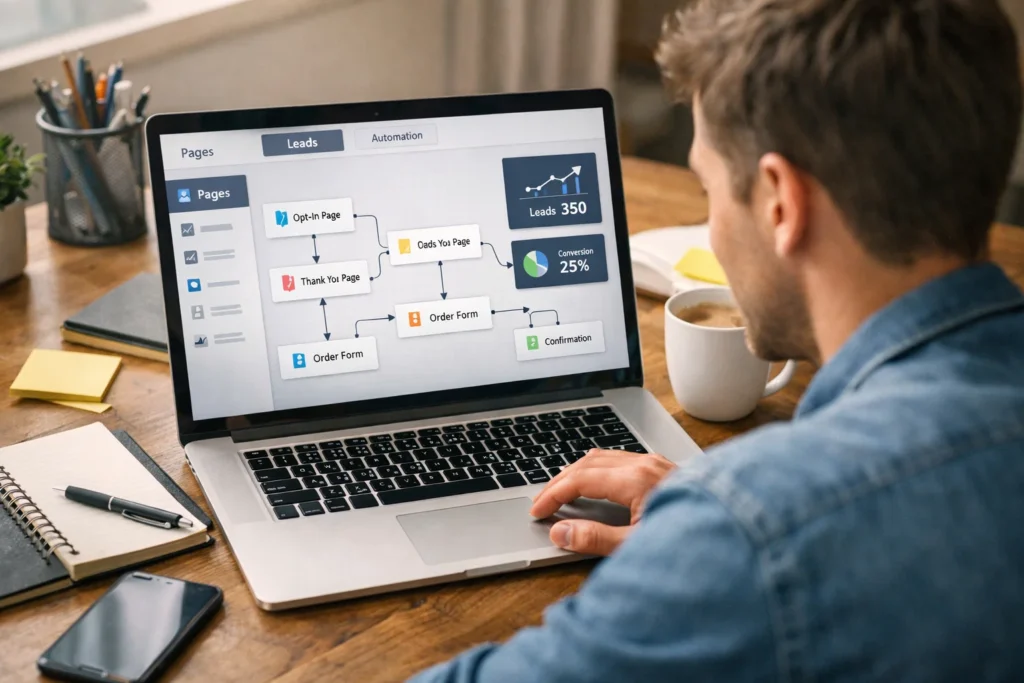
A funnel page may look simple on the front end, but a lot happens in the background before a visitor ever clicks a button.
That hidden side is what confuses many beginners. You open a funnel builder, see templates, drag a few blocks into place, and publish a page. From the outside, the process feels easy. Still, one question usually stays in the back of your mind: what is the software actually doing behind the scenes?
That is where things start to make sense.
How funnel builders work behind the scenes is not as mysterious as it first seems. These tools are built to connect several jobs into one system. They help create pages, collect visitor data, send people to the next step, trigger follow-up actions, and track what happens at each stage. Instead of making you stitch everything together by hand, the builder handles the structure in the background.
That does not mean funnel builders are magical. They are simply organized systems. Each part has a role. One part loads the page. Another stores form entries. Another triggers an email or moves the visitor to checkout. Another records conversions and visits. Once you see those parts clearly, the tool becomes much easier to use.
What a Funnel Builder Actually Does
A funnel builder is a tool that helps you create and manage the path a visitor follows from first click to final action.
That action could be a sale, a lead form, an email signup, a booked call, or a free trial. The builder gives you one place to set up those steps without needing to code each part from scratch.
On the surface, most funnel builders look like page editors. You drag in headlines, buttons, images, forms, videos, and testimonials. Then you style the layout and publish it. That is the visible part.
Behind the scenes, the builder is doing more than page design.
It is storing page settings, saving block layouts, loading scripts, linking forms to databases, routing button clicks, and assigning actions to user behavior. If someone enters an email address, the system may send that data to a contact list. If someone buys a product, the builder may redirect that person to a thank-you page, log the purchase, and trigger an email sequence.
That is why funnel builders feel powerful. They combine design, flow control, automation, and tracking inside one platform. Instead of using separate tools for every step, you manage the path in one place.
This is also why the word “builder” can be slightly misleading. You are not only building pages. You are building a process.
The Front End and the Back End of a Funnel
To understand funnel builders better, it helps to separate the front end from the back end.
The front end is the part visitors see. This includes the landing page, sales page, opt-in form, checkout page, thank-you page, pop-up, and design elements. It is the visual experience.
The back end is the hidden system that supports those pages. This is where the tool stores settings, handles submissions, tracks visits, manages contacts, processes actions, and triggers automations.
Think of a restaurant. The dining area is the front end. The kitchen, order flow, inventory, and staff process are the back end. The customer sees the meal and service. The team sees the real system underneath.
A funnel builder works in a similar way.
When a visitor clicks a button on a landing page, the front end shows the button. The back end decides what that click should do. Maybe the visitor moves to checkout. Maybe a form opens. Maybe a tracking event gets logged. Maybe all three happen together.
This split matters because beginners often focus only on what looks good. Design is important, but the process behind the design matters just as much. A page can look polished and still fail if the form is broken, the tracking does not work, or the follow-up never triggers.
That is why a good funnel builder is more than a design tool. It is a visual layer sitting on top of a working system.
How Funnel Builders Create Pages Without Coding Everything Manually
One of the biggest advantages of funnel builders is speed.
Instead of writing HTML, CSS, and JavaScript by hand, you use visual blocks. These blocks may include headlines, image sections, pricing tables, timers, buttons, forms, and FAQ areas. The builder turns those blocks into code behind the scenes.
That process usually works like this.
When you drag a heading into a page, the builder stores that choice in a structured format. That format may include the text, font size, spacing, position, color, and device settings. When the page loads for a visitor, the platform reads that stored data and generates the live page.
So the builder is not drawing the page like a design app. It is saving instructions and then turning those instructions into a working webpage.
This is why most builders let you edit quickly. Change the text once, and the system updates the stored instructions. Change the button style, and the output changes too. You are controlling settings, while the platform handles the code.
That convenience comes with tradeoffs. Builders can sometimes load extra scripts or styles that hand-coded pages may not need. Still, for most beginners, the time saved is worth it.
The key point is simple: the visual editor is only the surface. The real job happens when the builder translates those design choices into a functioning page visitors can load and use.
What Happens When Someone Visits a Funnel Page
The moment a person clicks your funnel link, a sequence begins.
First, the browser sends a request to the page address. That request reaches the funnel platform or hosting system. The platform responds by delivering the page files, layout data, styles, scripts, images, and tracking code needed to load the funnel step.
Then the visitor sees the page.
At the same time, the platform may already be logging useful details. It can record the visit, device type, traffic source, referral data, page path, session timing, or campaign tag. This helps the builder understand where the visitor came from and what happens next.
After that, the visitor interacts with the page. The person may scroll, click a button, watch a video, fill out a form, or leave without doing anything. Each action can trigger a new event.
A basic visit may involve several hidden steps:
- the page loads from the platform server
- tracking code starts recording the session
- buttons get linked to actions or destinations
- forms connect to a contact or lead system
- scripts prepare pop-ups, timers, or analytics events
None of this feels visible to the visitor. The page simply appears and responds. But the funnel builder is managing the flow in the background so each action can connect to the next step.
That is why funnels are more than static pages. They are active systems built to respond to user behavior.
How Forms, Buttons, and Inputs Connect to Actions
This is where funnel builders start to feel especially useful.
A form on a page is not just a design element. It is an input point. It collects data and sends that data somewhere. The same goes for buttons. A button is not only visual. It usually triggers an action.
When someone types a name and email into a form, the builder validates the entry first. It checks whether required fields are filled in, whether the email looks valid, and whether the form can be submitted properly. If the data passes that check, the platform stores it or sends it to an attached service.
Then the next step begins.
That step may include:
- saving the lead inside the builder’s contact list
- sending the data to an email tool
- tagging the contact based on the page or offer
- redirecting the visitor to a thank-you page
- starting an automation or email sequence
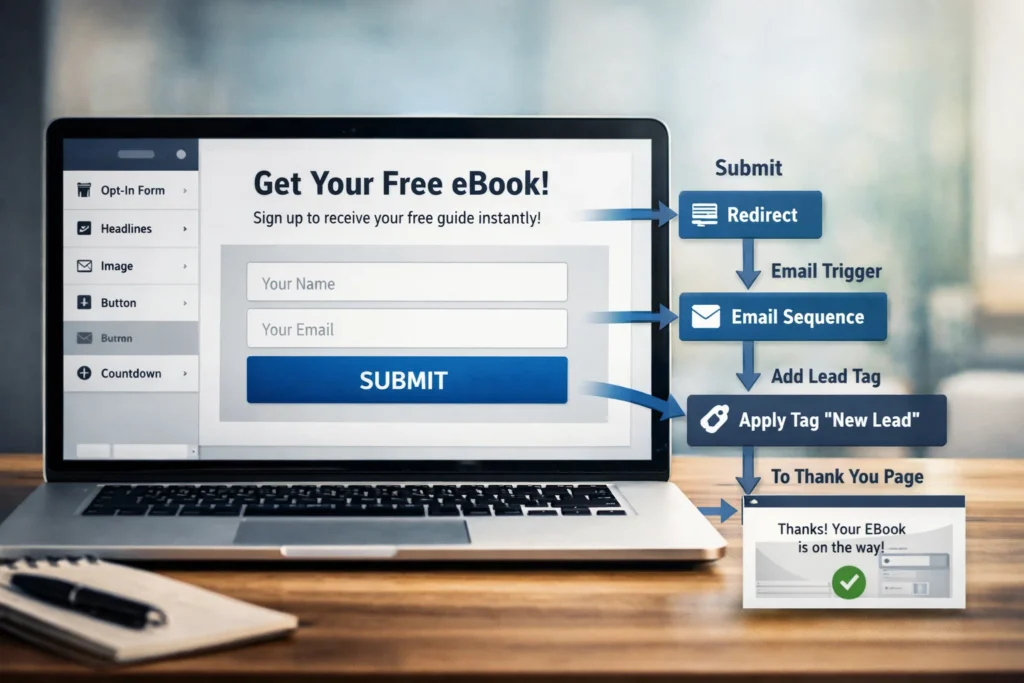
Buttons work in a similar way. A button may send the person to another funnel step, open a pop-up, submit a form, launch checkout, or trigger tracking.
This is one reason setup mistakes matter. If a button looks correct but points to the wrong action, the funnel breaks. If a form collects data but does not pass it to the email system, the lead is lost.
From the visitor’s side, the experience should feel simple. Behind the scenes, the builder is managing logic, validation, storage, and routing all at once.
How Funnel Builders Store Leads and Customer Data
When someone opts in, signs up, books a call, or makes a purchase, the platform needs a place to store that information.
Most funnel builders use an internal database or connected data system for this job. The stored information may include a contact’s name, email address, phone number, tags, page entry point, purchase history, form details, and time of submission.
This storage matters because the funnel is not just collecting clicks. It is building records.
A lead record helps the platform know who entered the funnel, what step that person completed, and what should happen next. If the visitor comes back later or reaches another page, the system may update the same contact profile instead of creating a new one.
Some builders handle this storage directly inside the platform. Others rely more on integrations with outside tools like email providers, CRMs, webinar platforms, or booking apps. In either case, the builder acts as the bridge between the page and the data layer.
That bridge often includes a few background actions:
- collecting the submission
- assigning the lead to a list or segment
- adding a tag or source label
- recording the funnel step completed
- triggering future actions tied to that profile
This is what makes follow-up possible. Without stored contact data, the funnel ends the moment the visitor leaves the page. With stored data, the system can keep the conversation going.
That is a big reason funnel builders matter for lead generation. They do not only display forms. They turn form activity into usable records.
How Automation Starts After a Visitor Takes Action
This is the part that makes funnel builders feel efficient.
Once a visitor completes a step, the platform can launch an automated response. That response may happen instantly or after a delay. Either way, the logic begins with a trigger.
A trigger is simply a rule that says, “When this happens, do that.”
For example, when a person submits a form, the builder may send a welcome email. When a customer buys a product, the builder may grant access to a membership area. When a person abandons checkout, the platform may send a reminder or apply a follow-up tag.
Common automation triggers include:
- form submission
- button click
- product purchase
- page visit
- appointment booking
- email open or link click
Once the trigger fires, the system checks the connected rule and carries out the next action. That may involve an email sequence, internal notification, tag update, SMS message, access delivery, or status change inside the funnel.
This is one reason funnel builders save so much manual work. Without automation, every new lead would need personal handling. Every buyer would need manual follow-up. Every reminder would require human effort.
Automation does not replace strategy, but it does make the system move smoothly after the first action happens.
How Checkout, Payments, and Order Pages Fit In
Funnels often lead toward a sale, so payment handling matters.
When a visitor reaches an order page, the builder displays the checkout interface. That page may include product details, pricing, billing form fields, order bumps, coupon options, and payment buttons. On the surface, the page looks like any other part of the funnel.
Behind the scenes, though, more sensitive work starts.
The funnel builder usually does not process money entirely on its own. In most cases, it connects with a payment gateway or outside processor. That processor handles the secure transaction layer, card validation, and payment approval. The builder acts as the page and logic manager around that payment flow.
Once the purchase succeeds, the platform may do several things at once:
- confirm the order
- log the sale inside the funnel system
- send the customer to a thank-you page
- trigger a receipt email
- apply customer tags
- unlock a product or membership area
- move the buyer into an upsell or next offer
This is why checkout setup needs care. A missing product link, wrong payment rule, or broken redirect can hurt revenue fast.
For beginners, the main thing to remember is this: the funnel builder controls the buying path, while the payment system handles the money transaction itself. The two work together.
How Tracking and Analytics Work Behind the Scenes
A funnel builder is not only trying to show pages and collect leads. It is also trying to measure what happens at each step.
That is where analytics come in.
Every funnel needs some way to track visits, conversions, drop-off points, and traffic behavior. The platform usually does this through tracking scripts, event logging, and step-based reporting.
When a visitor lands on a page, the builder may count that as a step view. When the visitor submits a form, the builder logs a conversion for that step. When the visitor reaches checkout but leaves before payment, the platform may mark a drop-off or abandonment event.
This data helps answer practical questions:
- how many people saw the page
- how many clicked through
- how many opted in
- how many reached checkout
- how many completed the purchase
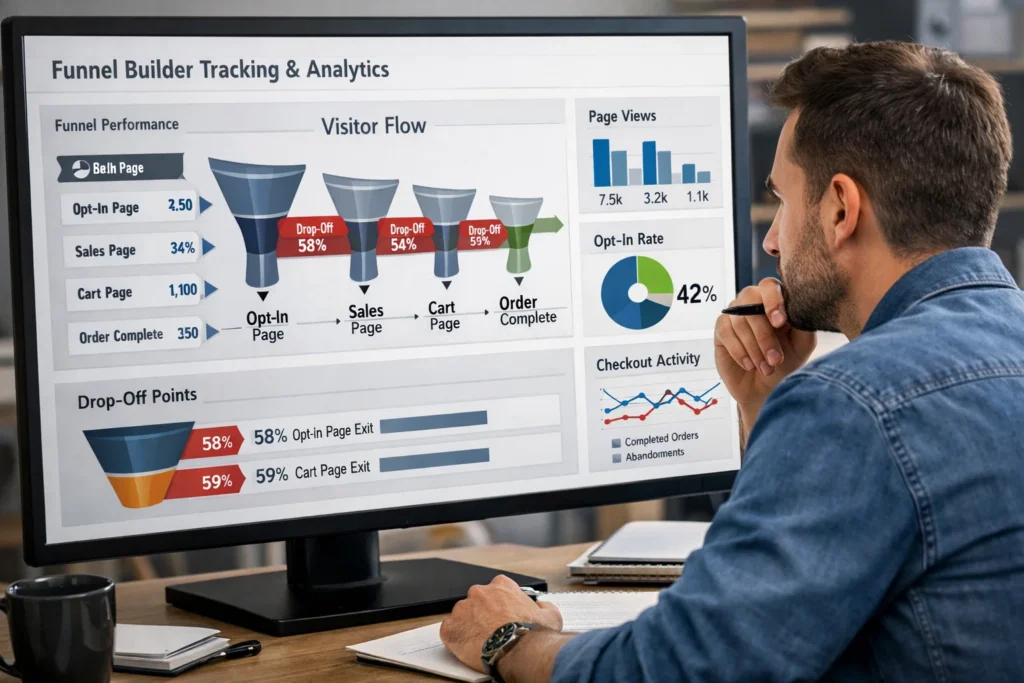
Some platforms also track revenue per visitor, source performance, split test results, and conversion rates across funnel steps. Even when the dashboard looks simple, a lot is happening underneath. The system is collecting event data and matching it to pages, sessions, and user records.
This matters because funnels improve through measurement. Without tracking, you only guess where the problem is. With tracking, you can see whether the headline, form, offer, traffic source, or checkout step needs work.
That is one of the quiet strengths of funnel builders. They combine action and measurement in one place.
Why Integrations Matter So Much in Funnel Builders
Very few funnel systems live alone.
Even if a builder has many built-in features, most users still connect outside tools. That could include email platforms, payment gateways, webinar apps, CRM systems, calendar tools, analytics services, SMS tools, or membership software.
An integration is what allows those tools to share information.
For example, when a person fills out a form, the builder may send that lead to an email platform. When a person books a call, the builder may sync that activity with a calendar tool. When a sale happens, the builder may notify a CRM or customer system.
Without integrations, funnel builders would feel isolated. They could still create pages, but the business process would be harder to manage. Integrations let the funnel become part of a larger workflow.
Common reasons integrations matter include:
- moving leads into email follow-up
- processing payments safely
- sending sales data to outside systems
- scheduling calls or appointments
- connecting tracking with ad platforms
- syncing customer records between tools
This also explains why setup can feel tricky at first. You are not only building pages. You are connecting systems that need to exchange information correctly.
Once the connections are stable, the funnel becomes much more useful. It stops being a page tool and starts acting like an operational system.
Common Problems Funnel Builders Handle Quietly in the Background
A well-built funnel feels smooth because the platform is solving small problems all the time.
Visitors do not see most of these fixes. The builder handles them quietly in the background so the page can keep working.
Some of those hidden jobs include:
- loading mobile-friendly layouts
- validating broken form entries
- managing redirects after actions
- preventing duplicate submissions
- saving partial progress in some cases
- applying tracking scripts correctly
- handling access permissions for members
- routing users to the right next step
This is why funnel tools can seem simple from the outside but still require strong engineering underneath. They are not just page apps. They are process managers with user-facing design on top.
When something breaks, the issue often sits in one of these hidden layers. A page may load fine, but the follow-up email never sends. A lead may submit the form, but the tag does not apply. A buyer may pay, but the product access does not unlock.
These are back-end workflow issues, not front-end design issues.
That is also why testing matters. Good funnel builders reduce the technical burden, but they do not remove the need to check the user journey step by step.
What Beginners Should Understand Before Using a Funnel Builder
Beginners often assume a funnel builder will solve everything once the page goes live.
That expectation causes frustration. The tool can make setup easier, but the builder does not create the offer, audience fit, or message for you. It only provides the structure.
A better way to think about a funnel builder is this: it is a system that helps your marketing logic run more smoothly.
Before you start, understand a few basics.
First, every funnel needs a clear goal. You should know whether the funnel is meant to collect leads, sell a product, book calls, or move people into a trial. Without that clarity, the page structure becomes messy.
Second, each step should have one job. A landing page should not try to explain everything at once. A checkout page should not distract people with too many side choices. Clean structure usually performs better.
Third, the hidden setup matters as much as the design. Test every form, every button, every automation, every email, and every redirect. A nice page that breaks behind the scenes is still a broken funnel.
Finally, keep the first version simple. Most beginners do better with one funnel path that works than with five funnel paths that create confusion.
Conclusion
Understanding how funnel builders work behind the scenes makes the whole tool feel less intimidating. What looks like a simple page editor is really a connected system handling design, user flow, data collection, automation, checkout logic, tracking, and integrations at the same time.
That is the real value.
A funnel builder helps turn separate tasks into one working path. It gives structure to the visitor journey and reduces the need to manage every moving part by hand. For beginners, that can save time and remove a lot of confusion.
Still, the software is only part of the picture. The best funnel builder cannot fix a weak offer or unclear message. What it can do is make your strategy easier to build, test, and improve. Once you understand what happens behind the scenes, you can use the tool with more confidence and fewer surprises.
FAQs
What is a funnel builder in simple terms?
A funnel builder is a tool that helps you create pages and connect them into a path that leads visitors toward a signup, sale, or other action.
Do funnel builders also host pages?
Many funnel builders host the pages for you, though some also allow custom domain use and outside connections depending on the platform.
How do funnel builders collect leads?
They use forms connected to internal storage or outside tools. When a visitor submits details, the system saves the lead and can trigger follow-up actions.
Are funnel builders the same as website builders?
Not exactly. A website builder focuses more on general site pages. A funnel builder focuses more on guided conversion paths and action-based flows.
Do I still need email marketing with a funnel builder?
Often yes. Some funnel builders include email tools, but follow-up still matters because many visitors will not buy or act right away.