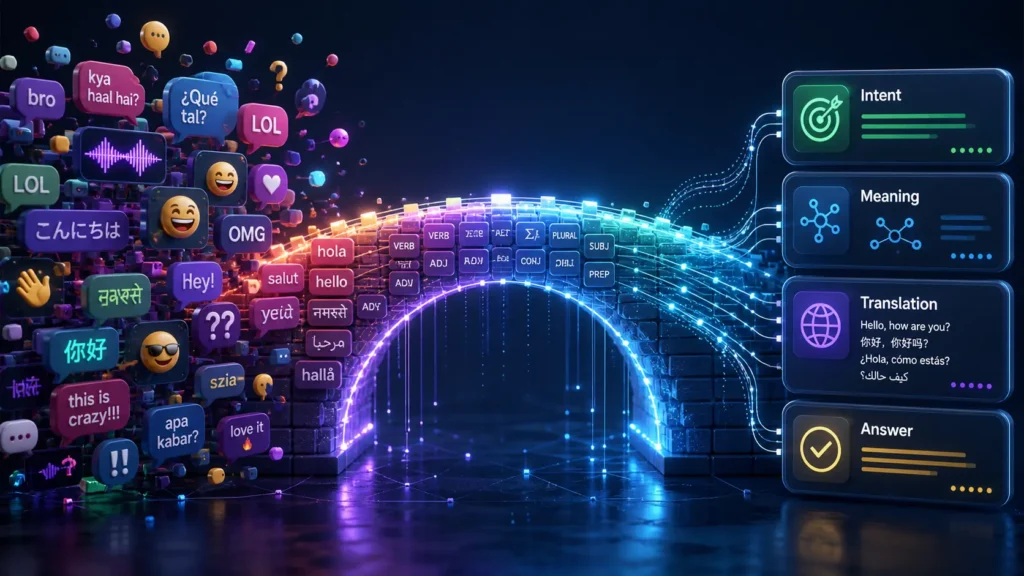
Natural language processing, often called NLP, is a field of technology that helps computers understand, process, and create human language. That language can be written or spoken. NLP helps machines work with words, sentences, meaning, tone, context, and intent.
That sounds complex, but the basic idea is easy to understand.
Humans use language in messy ways. We use slang, short forms, jokes, unclear grammar, and different meanings for the same word. A computer needs help to handle that mess. Natural language processing gives computers methods to work with human language more usefully.
This guide explains NLP in plain English. You’ll learn what NLP means, how NLP works, where people use it, and why NLP matters for total beginners.
What Is Natural Language Processing?
Natural language processing is a technology that helps computers work with human language.
The word “natural” means normal human language. That includes English, Spanish, Hindi, Arabic, and many other languages people use every day. The word “processing” means the computer reads, analyzes, organizes, or creates that language.
A simple example is a search engine.
You may type, “best shoes for walking all day.” The search engine does not only match exact words. The system tries to understand your meaning. You want comfortable walking shoes, not a general history of shoes.
Natural language processing helps the search engine understand that intent.
Another example is a spam filter. The filter reads email text and looks for patterns. It may notice strange phrases, suspicious links, or repeated scam language. Then the email app may send that message to spam.
NLP does not mean a computer understands language like a human. A computer does not feel meaning or emotion the way people do. The system studies patterns in words and data. Then the system uses those patterns to make useful decisions.
That difference matters.
NLP can be very helpful, but NLP can also misunderstand sarcasm, cultural context, vague wording, or emotional tone.
Why Natural Language Processing Matters
Natural language processing matters because language is everywhere online.
People search, message, review, comment, speak, shop, complain, ask, and learn through language. Businesses and apps need ways to handle that language at scale.
Without NLP, many modern tools would feel much weaker.
Search engines would struggle with natural questions. Chatbots would only follow fixed scripts. Translation tools would feel slow and limited. Voice assistants would fail more often. Customer support teams would have a harder time sorting messages.
NLP helps computers handle language tasks that would take humans too much time.
For example, a company may receive thousands of support tickets every week. A human team can read them, but sorting every message by hand takes time. NLP can help group messages by topic, urgency, or customer mood.
That does not remove the need for people. Human review still matters, especially for sensitive cases. But NLP can reduce busywork and help teams respond faster.
For everyday users, NLP makes digital tools feel easier. You can ask questions in normal language. You can dictate messages. You can translate signs. You can search without using perfect keywords.
That makes technology feel more natural.
How Natural Language Processing Works in Simple Terms
Natural language processing works by breaking language into parts, finding patterns, and linking those patterns to meaning or action.
A computer cannot understand a sentence the way a person does. First, the system must turn language into a form the computer can process. Then the system can analyze that language.
Let’s walk through the basic steps.
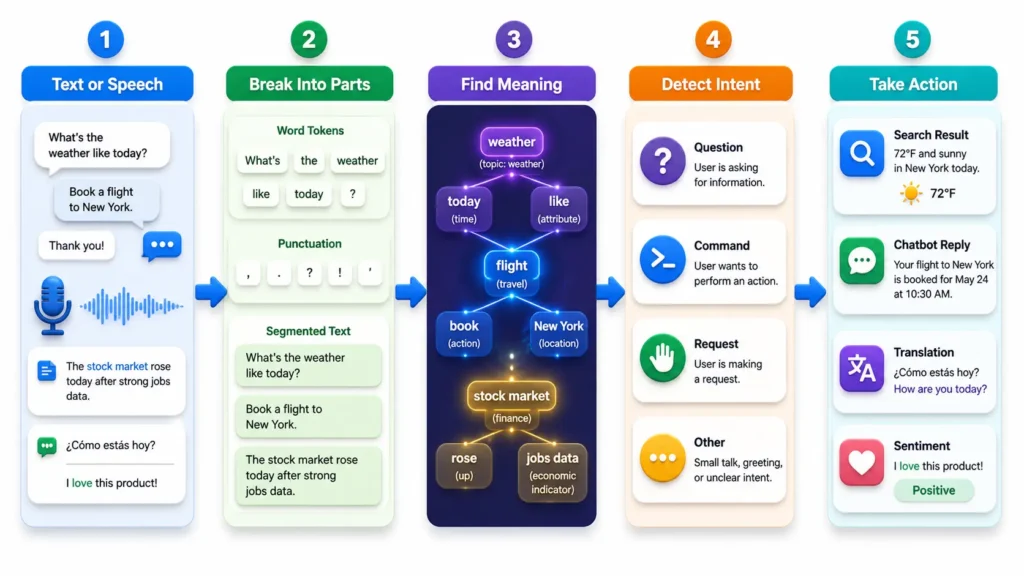
NLP starts with text or speech
Natural language processing begins with input.
That input may be typed text, a spoken command, a chat message, a product review, an email, a document, or a search query.
If the input is spoken, the system often changes speech into text first. This step is called speech recognition. After the spoken words become text, NLP can analyze the language.
For example, when you say, “Set a reminder for tomorrow morning,” your phone first captures your voice. Then the system changes your speech into words. After that, NLP helps identify the request.
The system needs to understand that you want a reminder, not a web search.
NLP breaks language into smaller pieces
Once the system has text, it breaks the language into smaller parts.
These parts may include words, phrases, punctuation marks, or sentence units. This helps the computer inspect the language more clearly.
For example, the sentence “Book a flight to London” has several important parts. “Book” may mean reserve something. “Flight” tells the system the type of booking. “London” gives the destination.
But language can be tricky.
The word “book” can also mean a printed object. A person may say, “I read a book.” In that sentence, “book” has a different meaning.
NLP systems must use context to choose the likely meaning.
NLP looks for patterns and meaning
After breaking the text into parts, the system looks for patterns.
The system may check word order, grammar, common phrases, and nearby words. More advanced systems also use large amounts of data to predict meaning from context.
For example, the phrase “apple pie” likely refers to food. The phrase “Apple support” likely refers to the company. The word “apple” changes meaning because the nearby words change the context.
NLP systems learn to handle these differences by studying many examples.
This is where machine learning often helps. A machine learning model can study large amounts of text and learn how words usually behave together. Then the model can make better guesses on new sentences.
NLP connects language to a task
After the system reads and analyzes the text, the system must do something useful.
That task depends on the tool.
A search engine may return results. A chatbot may answer a question. A translation app may create a sentence in another language. An email app may suggest a reply. A support tool may label a message as “billing issue.”
This task-focused step matters because NLP is not only about reading words. NLP helps systems act on language.
A simple voice command shows this clearly.
If you say, “Call Mom,” the system must understand your intent. The intent is not to define the word “call.” The intent is to start a phone call with a saved contact named Mom.
Good NLP turns language into useful action.
Natural Language Processing and Machine Learning
Natural language processing and machine learning often work together.
NLP is the field focused on human language. Machine learning is a method that helps computers learn patterns from data. Many NLP tools use machine learning because language has too many patterns for simple fixed rules.
Older NLP systems often used hand-written rules. A developer might write rules for grammar, keywords, and sentence structure. This worked for narrow tasks, but human language quickly became too complex.
People say things in many different ways.
For example, these sentences can mean almost the same thing:
- “I need help with my order.”
- “Where is my package?”
- “My delivery hasn’t arrived.”
- “Can someone check my shipment?”
A strict rule-based system may miss some of these. A machine learning system can learn that these messages often belong to a delivery or order support topic.
Modern NLP systems often use large language models, deep learning, and statistical patterns. These systems can handle more flexible language than older rule systems.
Still, machine learning does not make NLP perfect.
The system may learn from biased data. The system may misunderstand a rare phrase. The system may produce a confident but wrong answer. Human review and careful design remain important.
Common NLP Tasks Beginners Should Know
Natural language processing includes many tasks. You do not need to learn all of them at once. A few common tasks explain most everyday uses.
Text classification
Text classification means sorting text into categories.
An email app may classify messages as spam or not spam. A support system may classify tickets as billing, shipping, refund, or technical issue. A review tool may classify feedback as positive, neutral, or negative.
Text classification helps teams manage large amounts of text faster.
For example, an online store may receive many customer messages. NLP can send refund questions to one team and delivery questions to another team. Customers get help faster because messages reach the right place sooner.
Sentiment analysis
Sentiment analysis tries to identify emotional tone.
The system may label text as positive, negative, or neutral. Some systems also detect stronger feelings, such as anger, joy, confusion, or disappointment.
Businesses use sentiment analysis to understand reviews, surveys, social posts, and support messages.
For example, a hotel may scan reviews to find common complaints. If many guests mention “dirty bathroom” or “slow check-in,” the hotel can fix those problems faster.
Sentiment analysis can help, but the task is hard. Sarcasm, jokes, and mixed feelings can confuse the system.
A sentence like “Great, another delay” may look positive because of the word “great.” But a human knows the tone is negative.
Named entity recognition
Named entity recognition finds important names in text.
These names may include people, places, companies, dates, prices, products, or locations.
For example, look at this sentence:
“Sarah booked a flight to Paris on June 12.”
An NLP system may identify “Sarah” as a person, “Paris” as a location, and “June 12” as a date.
This helps search tools, document tools, booking systems, and business software pull useful details from text.
Translation
Machine translation changes text from one language to another.
Translation tools use NLP to understand the source language and create a useful version in the target language. This task is difficult because words do not always match one-to-one across languages.
Culture, grammar, tone, and context all matter.
A phrase that sounds normal in one language may sound strange in another. Good translation systems try to keep the meaning, not only the words.
Text generation
Text generation means creating new text.
This can include suggested replies, summaries, product descriptions, chatbot answers, and writing suggestions. The system uses patterns from language data to produce text that fits the request.
Text generation can save time, but people should review the output. The system may miss context, choose the wrong tone, or include errors.
Human editing is still valuable.
Where You See Natural Language Processing in Daily Life
You probably use NLP more often than you think.
NLP appears in many tools that read, understand, or create language. Some examples are obvious. Others happen quietly in the background.
You may see NLP in:
- Search engines that understand full questions
- Email spam filters
- Voice assistants on phones and smart speakers
- Translation apps
- Chatbots on websites
- Autocomplete and next-word suggestions
- Grammar checkers
- Customer support tools
- Review analysis tools
- Document search systems
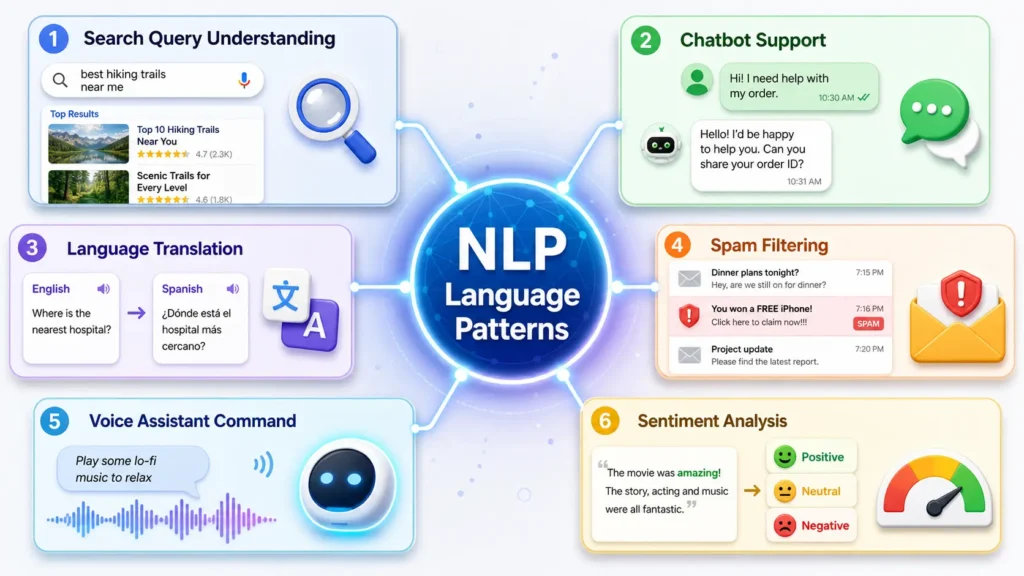
Think about a simple shopping search.
You type, “running shoes for flat feet.” The store search tool must understand that you want a specific type of shoe for a specific need. The system should not only show every product with the word “running.”
NLP helps the tool connect your words with product meaning.
Or think about customer reviews.
A company may have 50,000 reviews. Reading all of them by hand would take a long time. NLP can group common themes, such as price, comfort, shipping, quality, or customer service.
This helps people find patterns faster.
Natural Language Processing in Search Engines
Search engines depend heavily on language understanding.
Years ago, search engines focused more on exact keyword matches. If a page used the same words as your query, the page had a better chance. That still matters in some ways, but modern search has become more meaning-based.
People search in natural language now.
They type questions like:
“How do I fix a slow website?”
“What shoes are best for standing all day?”
“Why does my phone battery drain so fast?”
NLP helps search engines understand the topic, intent, and context behind those queries.
This matters for website owners and content writers too.
Good content should answer real questions in clear language. You do not need to repeat the same keyword again and again. Search systems can often connect related words, phrases, and meanings.
For example, an article about natural language processing may also mention NLP, language models, text analysis, speech recognition, chatbots, and machine learning. These related ideas help the topic feel complete.
Clear writing helps readers and search systems.
If readers can understand your content easily, search engines can often understand the structure better too.
Natural Language Processing in Chatbots
Chatbots are one of the most common NLP examples.
A basic chatbot may follow fixed scripts. It may show buttons, menus, and pre-written answers. That can work for simple tasks.
An NLP chatbot tries to understand what a person types.
For example, a customer may write, “I was charged twice for my order.” The chatbot should recognize a billing problem. Then the chatbot may ask for the order number or send the message to a billing team.
A customer may write the same issue in another way:
“You billed me two times.”
“My card got charged twice.”
“There are two payments for one order.”
NLP helps the chatbot connect these messages to the same problem.
Good chatbots can save time for simple questions. They can answer basic issues, collect details, or route people to the right team.
But chatbots still have limits.
Some problems need human care. A frustrated customer may need empathy. A complex billing issue may need deeper review. A medical, legal, or financial question may need professional judgment.
The best chatbot systems know when to hand the conversation to a person.
Natural Language Processing in Voice Assistants
Voice assistants use speech recognition and NLP together.
First, the system hears your voice. Then speech recognition turns your voice into text. After that, NLP tries to understand what you want.
If you say, “Play relaxing music,” the system must identify the action and the type of music. If you say, “Text John that I’m running late,” the system must identify the contact, message, and command.
Spoken language can be messy.
People pause, repeat words, use accents, speak fast, or change their minds mid-sentence. Background noise can also create errors. NLP helps the system make better sense of the text after speech recognition.
Voice assistants work best with clear tasks.
They can set reminders, play music, answer simple questions, send messages, start calls, and control smart devices. More complex requests can still confuse them.
This shows a useful lesson about NLP.
The system may seem smart, but the system still depends on clear input, strong data, and a well-defined task.
Benefits of Natural Language Processing
Natural language processing helps people and businesses handle language faster.
The main benefit is scale. A person can read one email. A team can read many emails. But a large company may receive thousands of messages, reviews, chats, and documents each day.
NLP helps process that language more quickly.
The benefits can include:
- Faster customer support routing
- Better search results
- Easier document organization
- Quick review analysis
- Better translation tools
- More useful voice commands
- Time-saving writing suggestions
- Stronger spam and fraud detection
NLP can also make technology easier for people who do not use perfect technical terms.
A person can type a normal question instead of using exact commands. That makes tools feel less rigid and more helpful.
For businesses, NLP can reveal patterns in customer language. If customers repeat the same complaint, the company can act on that feedback. If people ask the same question, the company can improve its help pages.
NLP turns messy language into clearer signals.
Limits and Challenges of NLP
Natural language processing has real limits.
Human language is full of hidden meaning. People use jokes, sarcasm, slang, emotion, cultural references, and incomplete sentences. These details can confuse NLP systems.
For example, the sentence “That was sick” can mean something was bad or something was impressive. The meaning depends on context and speaker style.
NLP systems can also struggle with:
- Sarcasm
- Mixed emotions
- Unclear references
- Rare words
- Slang
- Accents in speech
- Biased training data
- Low-quality text
- Multiple meanings
Privacy is another concern.
Many NLP tools process messages, documents, voice recordings, or customer data. People and businesses should understand how tools handle that information. Sensitive content needs careful protection.
Bias also matters.
If a system learns from unfair or unbalanced data, the system may repeat those patterns. This can affect hiring tools, moderation tools, support systems, and other serious uses.
NLP should support people, not replace careful judgment.
Natural Language Processing vs Speech Recognition
Beginners often mix up NLP and speech recognition.
They are connected, but they are not the same.
Speech recognition turns spoken words into written text. Natural language processing analyzes the meaning of that text.
Here is a simple example.
You say, “Remind me to call Dad at 6.”
Speech recognition changes the sound into words. NLP then identifies the task. The system understands that you want a reminder, the action is “call Dad,” and the time is 6.
Both parts matter.
If speech recognition hears the wrong words, NLP may process the wrong request. If speech recognition works well but NLP misunderstands the meaning, the assistant may still fail.
Voice tools need both strong speech recognition and strong language understanding.
Natural Language Processing vs Machine Learning
Natural language processing and machine learning are also different.
Natural language processing focuses on human language. Machine learning focuses on learning patterns from data.
Many NLP systems use machine learning. But not all machine learning systems work with language.
For example, a machine learning model may predict house prices from size, location, and age. That has nothing to do with language. Another machine learning model may classify customer reviews by sentiment. That task uses NLP because the data is text.
A simple way to remember the difference:
- NLP deals with words, speech, meaning, and language.
- Machine learning learns patterns from data.
- Many modern NLP tools use machine learning to handle language better.
This connection becomes clearer with real examples.
A spam filter uses NLP because the system reads email text. The filter may also use machine learning because the system learns spam patterns from past emails.
The two fields often work together.
How Beginners Can Learn NLP
You do not need to start with advanced code.
Begin with the basic idea. NLP helps computers work with human language. Then learn common tasks like text classification, sentiment analysis, translation, and text generation.
After that, try simple examples.
You can take a few product reviews and label them as positive, negative, or neutral. You can compare how different search queries show different intent. You can study how a chatbot responds to different wording.
These small exercises build understanding.
If you want to go deeper, learn basic data skills. Spreadsheets, simple charts, and beginner statistics can help. Then you can move into beginner Python tools later.
Good beginner projects include:
- Sorting reviews by sentiment
- Grouping support tickets by topic
- Creating a simple keyword-based FAQ bot
- Summarizing short text
- Finding names, dates, and places in text
Start small. NLP becomes easier when you connect each concept to a real language task.
Common Myths About Natural Language Processing
NLP can sound more human than it really is. That creates a few common myths.
Myth 1: NLP understands language like a person
NLP systems process patterns. They do not understand life, emotion, or meaning like humans do. The output may look smart, but the system still relies on data and probability.
Myth 2: NLP always knows the correct meaning
Words can have many meanings. Context can be unclear. Sarcasm can flip the meaning of a sentence. NLP systems can make mistakes.
Myth 3: Bigger systems are always better
Large systems can handle many tasks, but they still need careful use. A smaller tool may work better for a clear business task. The best system depends on the problem.
Myth 4: NLP removes the need for human support
NLP can handle simple tasks and reduce workload. But people still need to manage sensitive issues, complex problems, and emotional conversations.
Myth 5: NLP is only for tech companies
Many industries use NLP now. Healthcare, education, finance, retail, marketing, law, travel, and customer service all use language tools in some form.
Why NLP Will Keep Growing
Natural language processing will keep growing because people keep using language to interact with technology.
More people now search with full questions. More people use voice commands. More businesses receive large amounts of messages, reviews, and support chats. More tools need to understand documents, emails, and customer conversations.
NLP helps manage that growth.
The future of NLP will likely bring better search tools, stronger translation, smarter support systems, and more helpful writing tools. But better tools should also bring better responsibility.
People should ask clear questions about data use, privacy, fairness, and accuracy. These questions matter because language often includes personal details, emotions, and sensitive needs.
NLP can make tools more helpful. But thoughtful use makes NLP safer and more trustworthy.
For beginners, the main goal is simple.
Understand what NLP does. Know where you see NLP. Recognize both the benefits and limits. That foundation will help you understand many modern tools.
FAQs About Natural Language Processing
What is natural language processing in simple words?
Natural language processing is technology that helps computers work with human language. NLP can help computers read text, understand meaning, answer questions, translate languages, and process speech.
Is NLP the same as AI?
No. NLP is one part of artificial intelligence. AI is the larger field. NLP focuses on language tasks, such as search, chatbots, translation, and text analysis.
What is an example of natural language processing?
A common example is an email spam filter. The filter reads message text and looks for patterns that suggest spam. Other examples include voice assistants, translation apps, and chatbots.
Why is NLP difficult?
NLP is difficult because human language is messy. People use slang, sarcasm, mixed meanings, short phrases, and unclear grammar. Words can also mean different things in different contexts.
Can beginners learn NLP?
Yes, beginners can learn NLP by starting with simple examples. Text classification, sentiment analysis, search queries, and chatbot replies are good starting points.
Conclusion
Natural language processing helps computers work with human language.
That is the simple answer.
NLP powers tools that read text, understand speech, translate languages, suggest replies, sort messages, and answer questions. You see NLP in search engines, chatbots, email filters, voice assistants, grammar tools, and customer support systems.
The main idea is not hard. NLP turns messy human language into patterns a computer can process. Then the system uses those patterns to complete a task.

Zaid Akhtar specializes in traffic tools, lead generation systems, and online business programs. He evaluates offers based on long-term usefulness, learning curve, and value for money, not just flashy features.